
Tracking your expenses is the foundation of saving money. But with dozens of expense tracking apps on the market, the pricing can be confusing. Free apps sound perfect — until you hit a paywall or miss critical features. This guide breaks down what free vs. paid expense tracking software actually delivers, so you can spend less time deciding and more time saving.
Whether you’re a budgeting beginner or a small business owner, the right tool can turn scattered receipts into real savings. And sometimes, combining digital tracking with a physical savings challenge (like a wooden money box or 100-envelope binder) helps you physically stash cash from the expenses you’ve cut.
Table of Contents
Free vs Paid Expense Tracking Software: The Big Picture
Free apps are great for getting started, but they often limit bank account connections, automation, or reporting. Paid plans unlock features that save you hours each month — and help you catch overspending before it happens.
Here’s a quick comparison of what you typically get at each price tier.
| Feature | Free Version | Paid Version (typically $3–$15/month) |
|---|---|---|
| Manual expense entry | ✅ Yes | ✅ Yes |
| Bank account sync | ❌ Limited or 1 account | ✅ Unlimited accounts |
| Automatic categorization | ❌ Basic / manual | ✅ AI-powered rules |
| Receipt scanning | ❌ Often limited | ✅ Unlimited scans |
| Custom reports & budgets | ❌ Basic | ✅ Advanced with filters |
| Tax-deduction tracking | ❌ No | ✅ Yes (business plans) |
| Multi-user access | ❌ Single user | ✅ Teams or family plans |
| Ad-free experience | ❌ Ads present | ✅ Clean interface |
The bottom line: If you track more than 10–15 expenses per week, a paid plan quickly pays for itself by preventing missed deductions and duplicate spending.
What You Actually Get in Free vs Paid Apps
Free Expense Tracking — Who It’s For
Free apps work well if you only need a simple digital receipt log. You’ll manually enter amounts, tag categories, and maybe get a basic pie chart of your spending. Most free plans limit you to one financial institution for auto-imports, forcing you to manually add everything else.
Examples of free features you can count on:
- Manual transaction entry with date, amount, and category
- A monthly spending summary (no line-item details)
- Basic export to CSV
What you miss: Real-time alerts, recurring expense deduction, receipt photo OCR, and any kind of tax-ready report.
Paid Expense Tracking — The Real Value
For $5–$10 a month, paid apps like Mint Premium, YNAB, or QuickBooks Simple Start give you automatic bank feeds, smart categorization (machine learning that learns your habits), and custom budget tracking. Business versions add mileage logging, invoicing, and quarterly tax reports.
Key paid-only advantages:
- Auto-sync with all your bank accounts, credit cards, and PayPal — no manual entry.
- Smart categorization that tags recurring bills, groceries, dining — saving you minutes per transaction.
- Custom budget alerts when you’re about to overspend in any category.
- Receipt scanning that extracts amounts and stores the photo for audits.
For most people, the time saved alone justifies a $5–$10 monthly subscription.
Physical Savings Tools to Supercharge Your Software
No matter how great your expense tracker is, you still need a system to save the money you’re freeing up. Many people find that pairing digital tracking with a tangible savings method boosts motivation and accountability.
Here are popular physical tools that can help you set aside cash after you’ve optimized your spending.
Savings Challenge Boxes

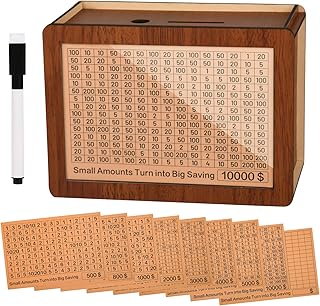
Wooden Money Saving Box – $16.99 – Rating 4.6
This reusable box lets you save for $500, $1,000, $5,000, or even $10,000. The built-in counter and dry-erase pen let you track your progress alongside your app’s data. Ideal for goal-specific savings (e.g., a vacation fund you built by cutting dining out).
For a more classic approach, try the 100 Envelopes Money Saving Challenge binder – $8.99 (Rating 4.7). It helps you save $5,050 over 100 deposits. Perfect for those who want a physical envelope system to complement digital tracking.

Other highly-rated options include the 10,000 Kakeibo Wooden Challenge Box ($7.99, 4.4 stars) and the NICOOTH 100 Envelopes Binder ($6.48, 4.7 stars). Both allow you to set a target amount – like the $10,000 you save from monthly tracking – and physically deposit cash as you hit milestones.
Cash Drawers and Budget Binders
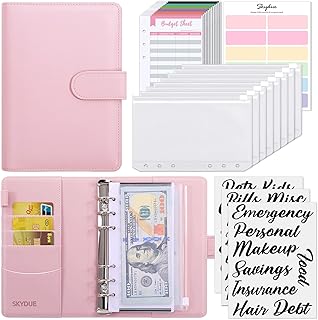
For small business owners or families, a cash box with lock like the KYODOLED Cash Box ($22.99, 4.7 stars) provides a secure place to store budgeted cash for categories like groceries or entertainment. Pair it with a SKYDUE Budget Binder ($8.98, 4.7 stars) that includes expense budget sheets for a complete analog-digital hybrid system.
How to Choose Between Free and Paid Software
Ask yourself these four questions:
-
How many expenses do I track per month?
More than 50? Paid sync and auto-categorization will save you hours. -
Do I need tax-ready reports?
If you freelance or run a side business, paid plans often include Schedule C estimates and receipt storage. -
Am I disciplined with manual entry?
If you forget to log expenses for more than two days, paid auto-import becomes essential. -
What’s my budget for tools?
A $5–$10 monthly subscription is less than one typical takeout coffee run per week – and you’ll likely save 10x that by using the tool properly.
If you’re still unsure, start with a free trial of a paid app or use a free version for 30 days, then upgrade when you hit its limits.
FAQ: Expense Tracking Software Pricing
Q1: Is free expense tracking software really free?
Yes, but "free" usually means ad-supported or with limited features like one bank connection and no receipt scanning. You can use it indefinitely, but you’ll hit paywalls for advanced reports and automation.
Q2: Do paid apps offer a money-back guarantee?
Most reputable apps like YNAB and QuickBooks offer a 30–60 day free trial or money-back guarantee. Always check the terms before committing.
Q3: Can I use free software for a small business?
You can, but you’ll miss features like invoicing, mileage tracking, and tax categorization. Many free apps restrict business-use features to paid tiers.
Q4: What is the average cost of expense tracking software?
Personal apps range from $0–$15/month. Business plans are typically $15–$30/month. Some offer annual discounts.
Q5: Do I need physical savings tools if I already track expenses?
Not required, but physical methods (like the Wooden Money Saving Box) help you physically separate money you’ve decided to save, reducing temptation. Many users report higher success rates when mixing digital tracking with tangible cash goals.
Final Takeaway
Free expense tracking software is perfect for casual users, but paid plans unlock time-saving features that directly boost your savings. Combine digital tracking with a physical savings challenge — like the affordable 100 Envelopes Money Saving Binder — to turn your reduced expenses into real cash you can see and touch.
Start with a free tool, identify what’s missing, and then upgrade. The few dollars a month you spend on software will come back to you many times over in smarter spending and better habits.