
Tracking every dollar is the foundation of smart saving. But with dozens of expense tracking apps on the market, choosing the right one can feel overwhelming. The best budgeting apps automate data entry, show you where money goes, and help you stick to a plan. However, even the most advanced app works best when paired with a tangible savings system.
Combining a digital tracker with a physical savings tool—like a Wooden Money Saving Box—can motivate you to reach goals faster. This guide breaks down the essential features every great expense tracking app should have and shows you how to amplify your results with real-world saving aids.
Table of Contents
Key Features to Look for in an Expense Tracking App
Automatic Transaction Import & Categorization
Manual entry is the #1 reason people abandon budgeting apps. Look for an app that syncs with your bank, credit card, and investment accounts. Automation pulls in transactions and assigns them to categories like groceries, rent, or entertainment. This saves you hours and reduces errors.
Customizable Budgeting Tools
A one-size-fits-all budget rarely works. The best apps let you create custom categories, set spending limits, and roll over unused funds. Whether you use the 50/30/20 rule or envelope-style budgeting, your app should adapt to you.
Real-Time Spending Alerts
Notifications when you exceed a budget or when a large transaction posts keep you accountable. Many apps also send weekly summaries so you never lose sight of your financial health.
Goal Tracking & Projections
Want to save for a vacation, an emergency fund, or a down payment? Top apps let you set savings goals, track progress, and even project when you’ll reach them. This feature turns abstract numbers into actionable motivation.
Security & Privacy
Your financial data is sensitive. Choose an app with bank-level encryption, two-factor authentication, and a clear privacy policy. Read reviews to ensure the company has a solid track record of protecting user data.
Reports & Insights
Visual charts—like spending by category or net worth over time—help you identify patterns. The most useful apps offer exportable reports for tax time or financial planning.
Top Expense Tracking Apps to Consider
| App | Best For | Key Feature |
|---|---|---|
| Mint | Free all-in-one tracking | Automatic categorization & credit score |
| YNAB (You Need A Budget) | Proactive budgeting | Goal-based enforcement |
| PocketGuard | Simplicity | “In My Pocket” spending limit |
| Personal Capital | Investment tracking | Net worth & retirement planning |
| EveryDollar | Zero-based budgeting | Dave Ramsey method integration |
Each of these apps excels in the core features above. But to truly supercharge your savings, integrate a physical system that makes the act of saving tangible.
Physical Savings Tools to Supercharge Your Budgeting
Even with the best app, savings can feel abstract. Physical tools—cash boxes, envelope systems, and binders—turn goals into daily actions. Here are top-rated options to pair with your expense tracker.
Wooden Money Saving Challenge Boxes
These reusable boxes let you save toward a specific dollar amount by dropping cash into numbered slots. They double as a piggy bank and a visual tracker.

Wooden Money Saving Box, Cash Vault Savings Box for $10000 $5000 $3000 $1000 $800 $500 – $16.99, ⭐ 4.6
Includes a dry-erase pen, savings trackers, and rubber band. Choose your target amount and stick to a weekly or monthly deposit plan.
Another great option is the 10000 Kakeibo Wooden Money Saving Challenge Box – $7.99, ⭐ 4.4, offering 10 different amount options.
And the Wooden Money Saving Box, Piggy Bank for Kids & Adults – Reusable $10,000 Savings Challenge Box – $7.99, ⭐ 4.5, comes with a progress tracker.
Envelope Systems & Budget Binders
The envelope method is a proven way to cap spending categories. Modern versions come in A5 binders with pre-numbered envelopes.

100 Envelopes Money Saving Challenge, 100 Envelope Challenge Binder – $8.99, ⭐ 4.7
Saves you $5,050 over the year. Each envelope is pre-numbered so you know exactly how much to deposit. The binder keeps everything organized.
The NICOOTH 100 Envelopes Money Saving Binder – $6.48, ⭐ 4.7, offers the same challenge at a lower price.
Prefer a more professional setup? The SKYDUE Budget Binder – $8.98, ⭐ 4.7, comes with zipper envelopes and expense budget sheets to track every cash outflow.
Cash Boxes for Small Businesses & Flea Markets
If you run a side hustle or sell at craft fairs, a lockable cash box keeps your earnings secure.
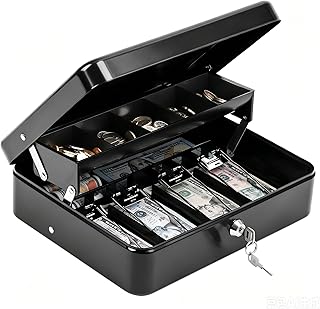
KYODOLED Cash Box with Key Lock – $22.99, ⭐ 4.7
0.7mm thick metal, auto-pop coin tray, and windproof bill clips. Ideal for vendors who need to sort cash by denomination.
How to Combine Apps and Physical Tools for Maximum Savings
Step 1: Choose your app. Pick one from the table above that fits your lifestyle. Set up automatic bank syncing and create categories that mirror your physical envelopes or box slots.
Step 2: Set savings targets. Use the app to calculate what you can save per week or month. Then assign that amount to your physical tool—for example, $50/week into the Wooden Money Saving Box.
Step 3: Log cash transactions. Whenever you deposit physical cash, record it in your app as a transfer to savings. This keeps your digital picture accurate.
Step 4: Review monthly. Compare the app’s spending report to your physical envelope balances. If one category is consistently over, adjust your budget or envelope allocation.
FAQ
What is the best expense tracking app for beginners?
Mint is the most beginner-friendly because it syncs automatically and requires no manual budget setup. Its free tier covers all essentials.
Can I use an envelope system without an app?
Yes. A physical budget binder like the SKYDUE Budget Binder works completely offline. However, combining it with an app gives you reports and projections that manual tracking cannot.
Are wooden savings boxes reusable?
Most quality boxes, including the 10000 Savings Challenge Box – $6.99, ⭐ 4.2, are reusable. They come with dry-erase surfaces or removable stickers so you can start a new challenge.
How often should I review my expense tracking app?
A quick weekly review helps catch errors and adjust budgets. A deeper monthly review—comparing actual spending vs. goals—keeps you on track.
Do expense tracking apps share my data with third parties?
Reputable apps use bank-level encryption and do not sell your data. Always read the privacy policy. Apps like YNAB and PocketGuard are well-regarded for data security.