
Saving money starts with knowing where every dollar goes. But if tracking expenses feels like a chore, you’ll skip it—and your savings suffer. The secret is capturing expenses fast, before you forget them. When you record spending immediately, you gain accurate data to cut waste and boost your savings rate.
This guide covers three proven methods to capture expenses in seconds: snapping receipts, syncing bank feeds, and jotting manual notes. We’ll show you how each works, plus the physical tools that make the process effortless. Ready to take control of your monthly expense tracking? Let’s dive in.
Table of Contents
Why Speed Matters in Expense Tracking
Every delayed expense entry opens the door to guesswork. Miss a coffee purchase or a small subscription, and your monthly totals are off. Fast capture builds a reliable picture of your spending habits.
Once you have clean data, you can spot areas to trim. That $5 daily latte? It adds up to $150 a month—money you could redirect into a savings challenge. Products like the Wooden Money Saving Box (priced at $16.99, rating 4.6) help you visualize those savings goals. But first, you need to track every expense.

Method 1: Receipts – Digital and Physical
Receipts are the oldest expense capture tool, but they still work brilliantly when used right. The trick is to avoid crumpled paper piles.
How to Capture Receipts Fast
- Use a receipt scanning app – Snap the receipt immediately after a purchase. Apps like Expensify or Smart Receipts extract amounts, dates, and categories in seconds.
- Designate a physical drop spot – For cash or store receipts, keep a single folder or envelope at home. Empty it weekly and enter the data into your tracker.
Best Receipt Workflow for Savers
Pair receipt capture with a budgeting binder. The SKYDUE Budget Binder (priced at $8.98, rating 4.7) includes expense budget sheets and cash envelopes. Slip receipts into the matching envelope category, then log totals later.
This method ensures no expense gets lost. You can also use the binder to track cash savings—perfect for an envelope challenge like the 100 Envelopes Money Saving Challenge Binder ($8.99, rating 4.7).

Method 2: Bank Sync – Automatic and Accurate
Bank sync pulls transactions directly from your accounts. No manual entry needed. Most budgeting apps (YNAB, Mint, EveryDollar) offer this feature.
Advantages of Bank Sync
- Time savings – Transactions appear automatically, usually within 24 hours.
- Categorization – Many apps learn your spending patterns and assign categories.
- No missed transactions – Every card swipe is captured, even forgotten subscriptions.
Watch Out for Common Pitfalls
Bank sync isn’t perfect. Transactions may be pending or categorized incorrectly. Always review your feeds weekly. For cash expenses (the ones that don’t hit your bank), you’ll still need manual notes.
That’s where a combined approach shines. Use bank sync for digital spending, and a physical tool like the Wooden Money Saving Challenge Box ($7.99, rating 4.4) to track cash you set aside for savings. The box concept turns your savings into a tangible goal.

Method 3: Manual Notes – Simple and Flexible
Sometimes you need to jot down an expense right now—no receipt, no bank sync. Manual notes fill the gap perfectly.
Three Ways to Take Manual Notes
- Voice memo – Speak the amount and category into your phone. Transcribe later.
- Quick app entry – Use a note app (Apple Notes, Google Keep) with a simple format: “$3.50 coffee 3/15”.
- Pen and paper – Keep a small notepad in your bag or car. Bullet-point expenses as they happen.
Why Manual Notes Boost Savings
Manual capture forces you to be mindful of every purchase. That split-second pause can prevent impulse buys. Plus, you can record cash transactions that bank sync misses.
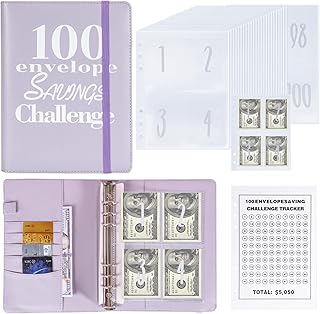
Combine manual notes with a dedicated savings tool. The NICOOTH 100 Envelopes Money Saving Binder ($6.48, rating 4.7) is designed for the $5,050 saving challenge. Use the binder pockets to store both cash and handwritten expense slips for the day.
Which Method Is Best for You?
Each method has strengths. The table below compares them at a glance.
| Method | Speed | Accuracy | Best For |
|---|---|---|---|
| Receipts (digital) | Fast | High | Physical store purchases, dining out |
| Bank Sync | Automatic | High (pending charges can vary) | Card transactions, subscriptions |
| Manual Notes | Instant | Moderate (needs transcription) | Cash spends, small impulse buys |
For maximum efficiency, combine all three:
- Use bank sync for 80% of your spending.
- Snap receipts for the other 10% (cash or non‑bank payments).
- Use manual notes for the final 10% (tips, small cash, forgotten items).
This hybrid workflow captures every expense without slowing you down.
How to Set Up Your Monthly Expense Tracking System
Building a system that sticks is simple. Follow these steps:
- Choose one capture method for the first week. Start with bank sync if you use a card most of the time.
- Add a second method for gaps. For example, keep a small notepad in your pocket for cash purchases.
- Set a weekly review time – 15 minutes every Sunday. Reconcile receipts, manual notes, and bank transactions.
- Move savings to a physical tracker – Use a Wooden Money Saving Box for $10,000 ($7.99, rating 4.5) to watch your money grow.

Frequently Asked Questions
How fast should I capture an expense after purchase?
Ideally within minutes. The longer you wait, the more likely you’ll forget the amount or category. Use manual notes or a receipt scan immediately.
Can I use only bank sync for expense tracking?
Yes, but only if you never use cash. Any cash transaction will be invisible to bank sync. You’ll need manual notes or receipts for complete tracking.
What’s the best tool for manual notes?
Pen and paper are still great. A budget binder like the Sooez 100 Envelopes Money Saving Challenge ($7.99, rating 4.7) provides pre‑numbered pockets for cash and notes. For digital notes, use any notes app with a quick‑add widget.
How do I handle forgotten expenses?
Don’t guess. If you can’t recall the exact amount, leave a placeholder (e.g., “miscellaneous $10”). The key is to avoid gaping holes in your data. Next time, use a manual note.
Should I track every tiny purchase?
Yes. Small expenses add up. A monthly coffee habit might be $60, but when you see it in your tracker, you can decide if it’s worth keeping. That’s how you save real money.
Conclusion
Capturing expenses fast is the backbone of smart saving. Combine receipts for physical purchases, bank sync for digital spending, and manual notes for cash. The tools you choose—like a budget binder or a money savings challenge box—turn tracking into a motivating habit.
Start today. Pick one method, implement it for a week, then layer on the others. Your future savings will thank you.