
Choosing the right budgeting app can make or break your savings goals. With dozens of options on the market, knowing what to look for helps you avoid hidden costs and wasted time.
This checklist breaks down the four most critical factors: subscriptions, fees, export capabilities, and bank sync reliability. Use it to compare any app before you commit.
Table of Contents
Why Your App Choice Matters for Saving Money
A budgeting app is only useful if it fits your financial habits. Pay for features you will actually use, and avoid apps that lock your data behind expensive tiers.
Many people start strong with a free app, only to hit a paywall when they need bank sync or custom reports. This checklist prevents that frustration.
Subscription Costs: Free vs. Paid Tiers
Most budgeting apps offer a free version with limited functionality. Before upgrading, ask yourself what you really need.
| Feature | Free Tier | Paid Tier |
|---|---|---|
| Manual entry | Usually included | Usually included |
| Bank sync | Rarely free | $5–$15/month |
| Reports | Basic | Detailed |
| Multi-device | Limited | Full access |
Pro tip: Start with a free trial of the paid version. Test bank sync and exporting before paying for a full year.
Hidden Fees to Watch For
Some apps charge fees beyond the monthly subscription. These catch users off guard.
- Transaction fees — A small percentage on connected payments or transfers
- Currency conversion fees — For apps supporting multiple currencies
- Overdraft or alert fees — Premium notifications can cost extra
- Data export fees — Charged when you try to leave the app
Always read the fine print. If an app doesn't list fees clearly on its pricing page, consider it a red flag.
Data Export Features
Your financial data should belong to you. Before choosing an app, verify what export formats are supported.
Most users need CSV exports for spreadsheets or tax preparation. Some apps only offer PDF exports, which are harder to analyze.
What to Look For in Exports
- CSV or Excel format
- QFX or OFX for importing into other financial tools
- Full transaction history, not just summaries
- Automatic scheduled exports (rare but valuable)
Without proper export options, migrating to a different app later becomes difficult and time-consuming.
Bank Sync Reliability
Bank sync is the feature that separates good budgeting apps from great ones. Unreliable sync leads to missing transactions and manual corrections.
Factors That Affect Sync Quality
- Number of supported banks in your country
- Sync frequency (daily vs. real-time)
- Connection stability — How often does the link break?
- Two-factor authentication handling
Some smaller apps use third-party services like Plaid or Yodlee for bank connections. If a bank updates its security protocols, sync can stop working for weeks.
Recommendation: Test bank sync during the trial period using both checking and credit card accounts. If transactions are delayed by more than 24 hours, the app may not suit your needs.
The Hybrid Approach: Combining Apps with Physical Tools
Many savers find that digital tracking alone isn't enough. A physical cash system reinforces your budgeting discipline and makes spending tangible.
The SKYDUE Budget Binder, Money Saving Binder with Zipper Envelopes, Cash Envelopes and Expense Budget Sheets for Budgeting is one of the most popular tools for this method. It includes zipper envelopes and budget sheets that complement any digital app.

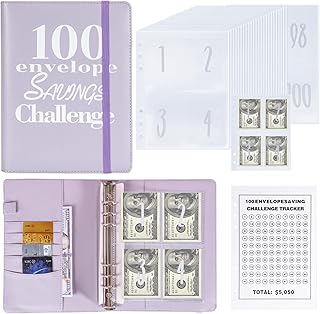
For those who prefer a structured challenge, the NICOOTH 100 Envelopes Money Saving Binder A5 Savings Challenge Book helps you save $5,050 over time while tracking progress manually.
Why Physical Tools Work
- Tactile feedback — Handling cash reduces impulse spending
- Visual progress — Seeing envelopes fill up motivates consistency
- No tech failures — Works offline and doesn't depend on bank sync
The best approach is often hybrid: use a digital app for tracking overall accounts and long-term goals, while using a physical binder or cash box for discretionary spending categories like groceries and dining.
A Wooden Money Saving Box, Cash Vault Savings Box for $10000 $5000 $3000 $1000 $800 $500 Target Money Saving Challenge can serve as a visual anchor for large savings targets. Write your goal on the dry-erase surface and watch your progress grow.

Final Checklist Table
Use this table to rate each app you evaluate. Score 1–5 for each criterion.
| Criterion | App 1 | App 2 | App 3 |
|---|---|---|---|
| Transparent pricing | |||
| No hidden fees | |||
| CSV/Excel export | |||
| Bank sync quality | |||
| Free tier usefulness | |||
| Physical tool compatibility |
Total the scores to find your best match.
FAQ
What is the best free budgeting app?
The best free app depends on your needs. Mint and EveryDollar offer solid free versions, though bank sync and multi-device access are often limited. Test two or three to see which interface fits your workflow.
Do budgeting apps with bank sync cost extra?
Yes, most apps charge a monthly fee for automatic bank syncing. Free tiers typically require manual entry. The cost ranges from $5 to $15 per month depending on the app and number of connected accounts.
Can I export my budgeting data to a CSV?
Most paid apps support CSV or Excel exports. Free versions often limit exports to PDF only. Check the app's export options before committing to avoid being locked in.
How often should I sync my bank accounts with my budgeting app?
Daily sync is ideal for tracking spending in real time. Apps that sync once every 24 hours are still useful, but you may miss transactions and overspend in a single day.
Are physical cash envelopes better than digital budgeting?
Many people find that using physical envelopes for variable expenses like groceries and entertainment helps control overspending. A hybrid approach—digital for tracking, physical for spending limits—often produces the best results.