

Every parent knows the dread of a credit card notification after a long gaming session. Your child may have just spent $100 on virtual gems, a battle pass, or a loot box without understanding it’s real money. In-app purchases and gaming microtransactions are a multi‑billion‑dollar industry, and children are often the target.
Understanding how these digital traps work is the first step to protecting your family’s finances. This guide explains the psychology behind in-app spending, common pitfalls, and practical steps you can take to prevent costly surprises. We’ll also share two essential books that will help you teach your kids about money from an early age.
Table of Contents
What Are In‑App Purchases and Why Are They So Addictive?
In‑app purchases (IAPs) allow users to buy virtual goods or unlock features inside an app or game. They range from cosmetic skins to “boosters” that speed up progress. The problem? The real cost is often hidden until after the transaction.
Game developers use behavioral psychology to encourage repeat spending. Features like time‑limited offers, “loot boxes” (random rewards), and “pay to win” mechanics create a sense of urgency and reward that mimics gambling. Children lack the impulse control to resist these tactics.
The “Free‑to‑Play” Trap
Many popular games are free to download but generate revenue through microtransactions. The initial download is just the hook. Once a child is engaged, they encounter paywalls, energy systems, or premium currencies that are confusingly priced. A pack of “gems” might cost $1.99, but a child doesn’t grasp that clicking “buy” charges a real credit card.
Digital Traps Parents Overlook
Not all digital traps are obvious. Here are the most common ones parents should know about:
- Loot boxes & gacha mechanics – Random reward systems that encourage repeated spending (similar to slot machines).
- Subscription scams – Apps that offer a “free trial” then auto‑charge after a few days.
- Hidden in‑game ads – Ads for other apps that, when clicked, initiate purchases without authentication.
- Account phishing – Fake offers for free currency that steal login credentials.
- Social pressure – Games that reward “gifting” items between friends, pushing kids to spend to keep up.
Internal link: Learn more about Most Common Financial Scams and How They Evolve to see how these patterns appear across different platforms.
The Cost: Real Numbers From Real Families
A 2022 study found that more than 40% of children aged 8–15 have made an in‑app purchase without parental permission. The average accidental spend per child? Over $200. Some families have faced bills of thousands of dollars from a single weekend of gaming.
The problem is amplified when multiple devices are linked to the same payment method. A child playing on a parent’s smartphone can easily bypass security if the card is saved on the account.
How to Protect Your Children (Step‑by‑Step)
1. Enable Parental Controls on Devices
- iOS: Go to Settings > Screen Time > Content & Privacy Restrictions. Require password for every purchase.
- Android: Use the Google Play Family Link app to approve all purchases.
- Consoles (PlayStation, Xbox, Nintendo): Set a spending limit per month and require a PIN for any transaction.
2. Remove Saved Payment Methods
Do not link your credit card to a child’s gaming account. Use prepaid cards or gift cards for any allowed spending. This limits the financial exposure to a fixed amount.
3. Educate About the Value of Money
Children often don’t understand that digital currency costs real dollars. Use simple analogies: “One gem pack is equivalent to two ice creams.” Better yet, involve them in budgeting for entertainment.
4. Set Clear Rules and Consequences
Create a family agreement about gaming spending. No purchases without asking first. If a child violates the rule, they lose gaming privileges for a period. Consistency is key.
5. Review Bills Together
Once a month, go over the credit card statement with your teenager. This teaches them how purchases add up and builds financial awareness for adulthood.
Books That Help You Teach Financial Literacy to Kids
The best defense against digital traps is a solid understanding of money. Two timeless books can help you, as a parent, learn how to talk about money and pass that knowledge to your children.

Rich Dad Poor Dad by Robert Kiyosaki is a classic that contrasts two mindsets about money. It teaches why financial education is more important than earning a high salary. The lessons on assets vs. liabilities are perfect for showing older teens how in‑app purchases drain value instead of building wealth.
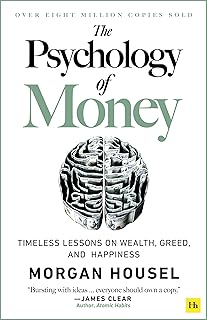
The Psychology of Money by Morgan Housel explores the emotional side of financial decisions. It explains why we make irrational choices—exactly what gaming companies exploit. Reading this book alongside your teenager can open a dialogue about delayed gratification and the hidden costs of “free” entertainment.
Comparison Table: Two Essential Finance Books
| Feature | Rich Dad Poor Dad | The Psychology of Money |
|---|---|---|
| Full Title | Rich Dad Poor Dad: What the Rich Teach Their Kids About Money That the Poor and Middle Class Do Not! | The Psychology of Money: Timeless lessons on wealth, greed, and happiness |
| Amazon Price | $9.31 | $10.99 |
| Rating | ⭐ 4.7 / 5 (107,400+ reviews) | ⭐ 4.7 / 5 (71,600+ reviews) |
| Focus | Mindset shift about earning, saving, and investing | Behavioral finance, how emotions drive money mistakes |
| Best For | Parents wanting a foundational money philosophy | Teens and adults who need to understand financial psychology |
| Buy at Amazon | |
|
Both books cost under $12 and provide knowledge that can prevent thousands of dollars in future fraud, bad spending habits, and digital traps.
What to Do If Your Child Already Made a Purchase
If you discover an unauthorized transaction, act fast:
- Dispute the charge with your credit card company. Many banks have a “friendly fraud” policy for minors’ purchases.
- Request a refund from Apple, Google, or the app developer. They often grant one-time refunds for minors.
- Change your payment method and enable purchase authentication immediately.
External link: For more detailed steps, see our guide on Chargebacks, Disputes, and How to Get Your Money Back.
Securing Your Digital Life Long‑Term
The rise of in‑app purchases is just one part of a larger landscape of financial scams. Teaching your children about digital safety now will protect them from identity theft, phishing, and other fraud later.
Build a personal fraud‑defense checklist for your household. Include items like: checking credit reports for minors, setting up fraud alerts, and discussing online sharing boundaries. Start early—before the next gaming session.
Internal link: Use our guide Building a Personal Fraud-defense Checklist and Action Plan to create a custom plan for your family.
Frequently Asked Questions About Kids and In‑App Purchases
How can I prevent in‑app purchases on my child’s iPhone?
Go to Settings > Screen Time > Content & Privacy Restrictions. Set “iTunes & App Store Purchases” to Don’t Allow or require a password for every purchase.
Are loot boxes considered gambling?
Many countries, including Belgium and the Netherlands, classify loot boxes as gambling. In the U.S., they are regulated but not banned. It’s safer to disable them in your child’s game settings or avoid such games altogether.
My child bought $300 worth of gems. Can I get a refund?
Yes, usually. Contact Apple Support, Google Play Support, or the game developer directly. Explain that the purchase was made by a minor without authorization. Most companies will issue a one‑time refund as a courtesy.
What are the best books for teaching kids about money?
For younger kids, The Berenstain Bears’ Trouble with Money is a great start. For ages 12+, Rich Dad Poor Dad and The Psychology of Money are highly recommended.
Should I let my child use a debit card for gaming?
No. Debit cards offer weaker fraud protection than credit cards. Use a prepaid card with a limited balance, or a credit card with tight spending alerts.
Final Thought: Knowledge Is the Best Antidote
Digital traps are designed to separate children from their money—and yours. But with the right parental controls, open conversations, and financial education, you can turn these risks into learning opportunities. The books we’ve recommended are a small investment that can pay dividends for a lifetime.
Start today. Check your child’s devices, remove saved credit cards, and pick up a copy of Rich Dad Poor Dad or The Psychology of Money. Your future self—and your child’s financial future—will thank you.