
Building better habits is the foundation of every meaningful transformation. Whether you’re aiming to drink your daily protein shake, meditate every morning, or read 10 pages a night, consistency is what separates progress from wishful thinking. The Loop Habit Tracker for Android promises to make that consistency effortless. But does it deliver? In this deep‑dive review, we’ll unpack every feature, weigh the pros and cons, and show you exactly how this free, open‑source app can supercharge your daily routine – especially if you’re serious about your fitness nutrition and protein intake.
Table of Contents
What Is Loop Habit Tracker?
Loop Habit Tracker is a lightweight, ad‑free Android app designed to help you build and maintain habits through simple score‑based tracking. Unlike bloated gamified apps, Loop focuses on what matters: marking habits done each day and watching your long‑term trends. It’s fully open source, respects your privacy, and runs offline. No accounts, no subscriptions, no distractions.
Developed by the open‑source community, Loop has been a staple on F‑Droid and Google Play for years. Its clean interface and powerful statistics make it a favourite among productivity enthusiasts and minimalists alike. For anyone who wants to track a daily protein powder routine, Loop gives you a clear visual of your “streak” and average compliance over weeks or months.
Key Features: What Makes Loop Stand Out?
Loop Habit Tracker isn’t flashy, but every feature serves a clear purpose. Here’s a breakdown of what you get:
1. Score‑Based Habit Scoring
Each habit gets a numerical score (0 to 4) based on how consistently you complete it. A higher score means stronger adherence. This is far more nuanced than a simple streak counter.
- How it works: Each successful day adds to your score; missed days gradually reduce it.
- Why it matters: You can see the real strength of a habit, not just “I did it 30 days in a row” (which could be easy habits). For a habit like “take protein powder after workout,” your score tells you how reliable that behaviour has become.
2. Flexible Scheduling & Reminders
Set specific days of the week, multiple times per day, or frequency goals (e.g., “3 times per week”). Custom reminders (with repeat options) keep you on track without being annoying.
3. Rich Visual Statistics
The real power of Loop is its graphical feedback. You get:
- A monthly calendar heatmap (like GitHub streaks).
- A completion chart showing your percentage over time.
- An individual habit graph for score trends.
- Export your data as CSV for deeper analysis.
4. Widgets & Quick Actions
Place a home screen widget to mark a habit completed in one tap. No need to open the app. This frictionless design is critical for daily habits like scooping your Optimum Nutrition Gold Standard 100% Whey Protein Powder, Double Rich Chocolate 1.98 Pound.
5. Fully Offline & No Ads
Everything stays on your device. No data collection, no creepy permissions. Loop respects your privacy – a rare gift in today’s app landscape.
6. Open Source & Customisable
Because Loop is open source, you can contribute code or request features. The app also supports material design themes, dark mode, and different accent colours.
7. Checkmark Notes
You can add a short note to each completed check – e.g., “Vanilla protein today” or “Double scoop post‑workout.” This helps you spot patterns later.
Pros of Loop Habit Tracker
- 100% free – no in‑app purchases, no ads, no premium tier.
- Extremely lightweight – under 5 MB, runs on old devices.
- Fine‑grained scoring – more honest than binary streaks.
- Excellent data export – CSV for spreadsheets or external analysis.
- No account required – complete privacy and offline use.
- Active open‑source community – regular updates and bug fixes.
- Simple but powerful – no learning curve.
Cons of Loop Habit Tracker
- Lacks gamification – no badges, leaderboards, or rewards.
- No cloud sync – data lives only on your device (backup manually via export).
- Front‑end design is dated – not as polished as modern habit apps.
- Limited habit types – no “negative habit” tracking (e.g., smoking).
- Reminders are basic – no location‑based or advanced logic.
- No integration with health apps – can’t pull data from Google Fit.
Loop Habit Tracker vs. Other Habit Apps
| Feature | Loop Habit Tracker | Habitica | HabitBull | Streaks |
|---|---|---|---|---|
| Price | Free | Free + Premium | Free + Paid | Paid ($5.99) |
| Gamification | None | RPG style | Minimal | None |
| Cloud Sync | No | Yes | Yes | iCloud only |
| Score System | 0–4 score | XP & HP | Streak count | Streak count |
| Open Source | Yes | No | No | No |
| Widget | Yes | No | Yes | Yes |
| Data Export | CSV | No | CSV | No |
For the money‑conscious user who values control and simplicity, Loop wins hands down. If you need social accountability or rich gamification, look elsewhere.
How to Use Loop Habit Tracker for Your Protein Routine
Let’s make this practical. Imagine you want to build the habit of drinking a protein shake every day after your workout. Here’s exactly how you’d set it up in Loop:
- Create a new habit: Tap the “+” button and name it “Post‑workout protein shake.”
- Schedule: Set it to repeat daily. If you only work out 5 days a week, choose “5 times per week” and select the days.
- Reminder: Set a time that works (e.g., 7:00 PM after your typical training session).
- Widget: Add a 1‑click widget to your home screen so you can log the habit in under 2 seconds.
- Notes: After each completion, note which flavour you used – helps you decide which Premier Protein Powder, Chocolate Milkshake you prefer.
Within a month, Loop’s score graph will show you exactly how consistent you’ve been. If your score stays above 3.5, you’ve cemented the habit.
Expert Insights: Why Data‑Driven Habit Tracking Works
As a behavioural psychology principle, visual feedback dramatically increases adherence. Loop provides that feedback without any fluff. According to research published in the Journal of Medical Internet Research, tracking habits with a simple check‑in reduces the mental effort of remembering and increases automaticity. Loop’s score system goes a step further – it penalises missed days slowly, which mirrors real‑life habit strength decay.
For fitness goals, pairing habit tracking with the right nutrition is key. Many users combine Loop with a structured supplement plan. For example, tracking “take morning protein” alongside “evening collagen” creates a complete routine. Consider adding Vital Proteins Collagen Peptides Powder to your habit list – Loop helps you remember even on lazy days.
Performance, Reliability & Privacy
Performance: Loop runs smoothly on Android 5.0+. It uses negligible battery and storage. Even with 20+ habits, the app opens instantly.
Reliability: Automatic backups are not built‑in, but you can manually export your data as JSON or CSV. This is a minor inconvenience, but the trade‑off is complete offline security.
Privacy: No internet permissions requested. Your data never leaves your phone. This is a massive advantage over apps that sell your behavioural data.
Customization & Personalisation
While Loop isn’t infinitely flexible, you can tweak:
- Colour palettes for each habit.
- Reminder frequency (every X hours).
- Habit sort order (manual or by score).
- Numeric goals (e.g., “drink 3 glasses of water” is tracked as quantity).
Advanced users can even fork the GitHub repository and add custom features.
Who Is Loop Habit Tracker For?
- Minimalists who hate bloated apps.
- Privacy‑conscious users.
- Data nerds who love CSV exports and trend charts.
- Fitness enthusiasts tracking supplement habits.
- Students and freelancers on a budget.
- **Anyone tired of subscription‑based habit apps.
It’s not for people who need social motivation, gamified rewards, or cloud sync. But for the core mission of building reliable habits, Loop is arguably the best free tool on Android.
How Loop Complements Your Protein Powder Habit
Let’s face it: remembering to mix a shake every day can be surprisingly hard. Life gets busy. You skip one day, then another. Loop provides the gentle structure you need. Set a reminder, tap the widget, and watch your consistency score climb.
Many Loop users pair it with a protein powder stash they keep visible. For instance, placing your Optimum Nutrition Gold Standard 100% Whey Protein Powder, Vanilla Ice Cream, 5 Pound container next to your coffee maker serves as a visual cue. Loop reinforces that cue digitally. Over time, the habit becomes automatic.
When you review your Loop statistics at the end of the month, you’ll see exactly how many days you stuck with your protein goal. That insight alone is worth the download.
Alternatives to Consider
- HabitBull – more features but freemium.
- Streaks – polished but iOS‑only and paid.
- Productive – beautiful design, subscription model.
- Microsoft To Do – good for tasks, weaker for habits.
Loop remains the champion of free, no‑nonsense habit tracking.
Frequently Asked Questions
Is Loop Habit Tracker really free?
Yes, completely free. No ads, no in‑app purchases, no premium version. It is funded by donations and maintained by volunteers.
Can I sync my Loop habits across multiple devices?
No official cloud sync. You can manually export your data (CSV/JSON) and import it on another device, but there’s no automatic sync. This is by design to protect privacy.
Does Loop work offline?
Absolutely. The app requires no internet connection. Everything is stored locally.
Can I track negative habits (like smoking)?
Loop is built for positive habits only. To track negative habits, you could invert the logic (e.g., “0 cigarettes today” as a daily habit), but it’s not ideal.
How do I back up my data?
Go to Settings > Export to CSV or JSON. Save the file to Google Drive or your computer. You can import the file later if you switch devices.
Does Loop have a widget?
Yes. It offers a resizable widget that can show multiple habits. Tap the habit to mark it done without opening the app.
Can I set different reminders for different days?
Yes. When creating a habit, you can choose specific days of the week. Reminders are then tied to those days.
Is Loop open source?
Yes. The source code is available on GitHub under the GPLv3 license. You can inspect it, fork it, or contribute.
Does Loop support dark mode?
Yes, it supports system‑based dark mode and a manual theme toggle.
Can I track habits multiple times per day?
Yes. When setting up a habit, you can choose “Multiple times per day” and set a numeric target (e.g., drink 8 glasses of water). Each completion counts toward the target.
Recommended Protein Powders to Pair with Your Habit Tracking
Now that you have a powerful habit tracker, fuel your consistency with high‑quality protein. Here are top‑rated powders (based on the latest Amazon data) that fit into any fitness routine.

Optimum Nutrition Gold Standard 100% Whey, Double Rich Chocolate 1.98 lb – $44.99 – Rating: 4.6
A classic choice: 24g of protein per scoop, excellent mixability, and great taste. Use Loop to track your daily scoop.

Optimum Nutrition Gold Standard, Vanilla Ice Cream 5 lb – $79.99 – Rating: 4.7
Budget‑friendly bulk option. Vanilla flavour blends well with smoothies. Set a Loop habit for “morning shake.”

Premier Protein Powder, Chocolate Milkshake, 30g Protein – $25.97 – Rating: 4.6
Low sugar (1g), gluten‑free. Ideal for keto dieters. Track your serving with a Loop reminder.

Orgain Organic Vegan Protein Powder, Vanilla Bean – $31.52 – Rating: 4.5
Plant‑based, 21g protein, plus prebiotic fibre. Perfect for vegans. Loop helps you remember even on rest days.

Dymatize ISO 100 Whey, Vanilla 5 lb – $108.99 – Rating: 4.7
Hydrolyzed isolate for rapid absorption. High price, but quality. Use Loop to ensure you never miss post‑workout.

Premier Protein Powder, Vanilla Milkshake – $31.60 – Rating: 4.6
Another low‑sugar, high‑protein option. Create a Loop habit for “afternoon snack shake.”

Transparent Labs Grass‑Fed Whey Isolate, French Vanilla – $59.99 – Rating: 4.5
Clean ingredients, 28g protein. Naturally flavoured. Track your intake with Loop for best results.

Body Fortress Super Advanced Whey, Vanilla 3.9 lb – $45.28 – Rating: 4.6
Budget‑friendly with added vitamins C, D, and zinc. Set a Loop reminder for “evening shake.”

Six Star Whey Protein Plus, Triple Chocolate – $24.97 – Rating: 4.5
Affordable and tasty. Perfect for those starting their habit journey.

Isopure Zero Carb Whey Isolate, Unflavored 3 lb – $89.95 – Rating: 4.4
Zero carbs, gluten‑free, and unflavoured – add to any drink. Use Loop to track your “daily protein” habit.

Dymatize Elite 100% Whey, Rich Chocolate 5 lb – $76.18 – Rating: 4.6
Great value for 25g protein and 5.5g BCAAs. Pair with a Loop habit for “post‑workout recovery.”
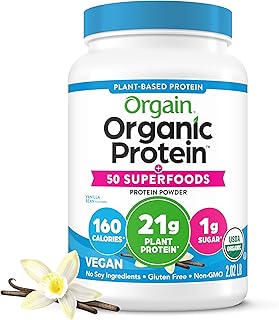
Orgain Organic Vegan Protein + 50 Superfoods, Vanilla Bean – $34.15 – Rating: 4.6
Nutrient‑dense plant protein with prebiotic fibre. Track your serving with Loop.

Dymatize x Fruity Pebbles ISO100 Whey Isolate – $42.48 – Rating: 4.6
Fun flavour, 25g protein. A great reward for completing your Loop habit graph.

Dymatize Super Mass Gainer, Gourmet Vanilla – $39.98 – Rating: 4.5
High calorie, 52g protein. For hardgainers. Use Loop to ensure you hit your daily mass‑gainer habit.

Levels Grass Fed Whey, Pure Chocolate 2 lb – $44.99 – Rating: 4.5
No artificial ingredients, 24g protein. Track your “afternoon shake” with Loop.

Vital Proteins Collagen Peptides, Unflavored – $18.65 – Rating: 4.6
Excellent for skin, joints, and hair. Add to coffee – then mark it done in Loop.

NAKED Whey Vanilla Protein Powder – $44.99 – Rating: 4.1
Only 3 ingredients: grass‑fed whey, vanilla, organic coconut sugar. NSF certified.

Nutricost Whey Protein Concentrate, Chocolate 5 lb – $74.95 – Rating: 4.5
Unbeatable value per gram of protein. Loop can track your daily servings.

Orgain Organic Unflavored Vegan Protein Powder – $26.99 – Rating: 4.3
21g plant protein, no sugar. Great for smoothies. Create a Loop habit for “lunch shake.”
Track your habits, fuel your body, and watch your consistency soar. Loop Habit Tracker gives you the data; these protein powders give you the nutrition. Start today, and your future self will thank you.
Further reading: If you’re new to Loop, check out our complete guide: Loop Habit Tracker for Android: a Complete Beginner’s Guide. And for step‑by‑step setup instructions, read How to Set up and Use Loop Habit Tracker on Android Effectively?.